
Published
Your application has enough to carry without its database arriving with a removal van. Galactus DB ships as a small, self-contained image, with Explorer in a separate package when you want a visual workbench.
That makes for a quick download and leaves more room for the interesting part: your graph. Here is what was in the suitcase in our September snapshot.
Small enough to notice
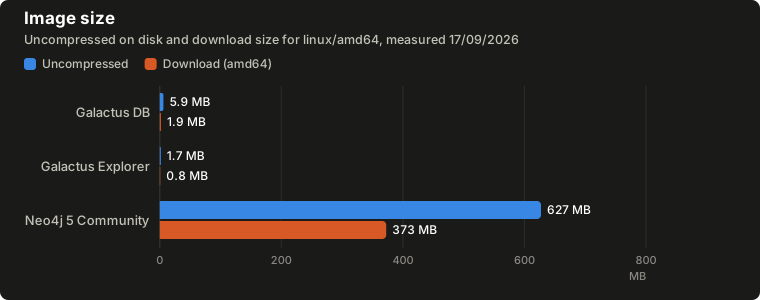
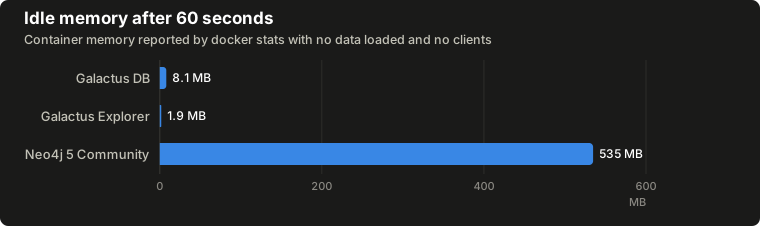
These figures compare the Galactus images and official neo4j:5 Community
image available on 17 September 2026. Tags move, so the numbers belong to
those builds.
| Image | Uncompressed | Download (amd64) | Download (arm64) | Layers | Idle memory after 60 s |
|---|---|---|---|---|---|
ianknowles/galactus-db:latest | 5.9 MB | 1.9 MB | 1.7 MB | 2 | 8.1 MB |
ianknowles/galactus-db-explorer:latest | 1.7 MB | 0.8 MB | 0.8 MB | 1 | 1.9 MB |
neo4j:5 (Community) | 627.2 MB | 372.6 MB | 370.7 MB | 5 | 534.7 MB |
The Galactus database and Explorer together downloaded in under 3 MB and used about 10 MB of RAM while idle. The Neo4j database image was roughly 105 times larger on disk, 193 times larger to download on AMD64, and used about 66 times the idle memory of the Galactus database image.
Those packages bring different things with them. Neo4j includes a Java
runtime, Browser, cypher-shell, plugin loading and a Debian base. Galactus
packages the database and workbench separately, which helps explain the gap.
What did we leave out of the suitcase?
The database ships as a statically linked Rust binary in a scratch
container. There is no operating-system layer, shell or separate language
runtime to download. The image contains the binary and a data directory
ready for use.
Explorer is optional. If your application talks directly to the database, you can leave the workbench image on the shelf. When you do want to explore connections visually, it is there to pull separately.
The database also runs as an unprivileged user and includes its own health probe, so it does not need a shell just to tell your container platform that it is listening.
Where packing light pays off
Think of a fresh development machine, a CI job starting from an empty image cache, or a deployment over a modest connection. A smaller download gives each less to fetch before the application can get on with its work.
Low idle memory also leaves breathing room for the application. It is useful when you run several environments, or simply prefer your database to settle in without taking over the sofa.
There are fewer bundled components to maintain, too. You still need to keep the database up to date and configure access for your deployment; a small container needs looking after just like a large one.
A small image can hold a growing graph
Download size and data capacity are different questions. Nodes, relationships and indexes need space as you add them. Galactus keeps graph structure and indexes in memory even when base properties are stored on disk, so size your instance for the graph you intend to run.
For memory use with data and queries in the mix, head to the Neo4j comparison.
About the figures
The comparison used each image's defaults with Docker Desktop 28.0.1 on
Windows 11. Uncompressed size and layers come from docker image inspect;
download sizes are the compressed image sizes reported by Docker Hub for
each architecture. Idle memory is the docker stats reading after 60 seconds
with no connections.
Neo4j's heap and page-cache settings affect its memory use. These are readings for the packaged defaults, rather than minimum requirements for either database. They are a guide to what arrives out of the box.
Neo4j is a registered trademark of Neo4j, Inc. Galactus DB is not affiliated with Neo4j, Inc.