Published
Galactus DB 2.1 lets a node hold tables. A customer keeps its orders, a sensor its readings, an account its ledger, as typed rows with a primary key, indexes and constraints, right on the node they belong to. You read and change them with SQL, in the same statement as your Cypher, in the same transaction. An order stored this way takes 63 bytes on disk instead of 85.

Why tables
Graphs are brilliant at connections: who knows whom, what depends on what, which path is shortest. They are less brilliant at the long lists that hang off each thing. A customer with five thousand orders is one interesting node and five thousand rows that all look alike, and storing each row as a node of its own pays for a node record, a relationship and an index entry every time.
A table keeps those rows together on their owner, stored once for their
shape. Tables with the same columns share one stored definition, so twenty
thousand customers' orders tables cost one schema, and each row stores
only its values.
What it looks like
Give a node a table, then use SQL on it:
MATCH (c:Customer {id: 1})
SET c.orders = TABLE (
  id        INTEGER PRIMARY KEY,
  placed_at LOCAL DATETIME NOT NULL,
  sku       STRING NOT NULL,
  qty       INTEGER NOT NULL DEFAULT 1 CHECK (qty > 0),
  amount    DECIMAL(12, 2),
  INDEX by_sku (sku, placed_at)
);

MATCH (c:Customer {id: 1})
CALL (c) SQL {
  INSERT INTO c.orders (id, placed_at, sku, amount)
  VALUES (1, localdatetime(), 'SKU-00042', 129.50)
  ON CONFLICT (id) DO UPDATE SET qty = orders.qty + 1
};
The braces mark where SQL starts and ends. A block can be a whole result,
CALL (c) SQL { … }, or a single value anywhere an expression goes:
// Customers with more than five large orders
MATCH (c:Customer)
WHERE SQL { SELECT count(*) FROM c.orders WHERE amount > 100 } > 5
RETURN c.name;

// Friends who bought what I bought this month
MATCH (me:Customer {id: $id})
WITH me, COLLECT SQL { SELECT DISTINCT sku FROM me.orders WHERE placed_at >= $monthStart } AS mine
MATCH (me)-[:KNOWS]->(f:Customer)
WHERE EXISTS SQL { SELECT 1 FROM f.orders WHERE placed_at >= $monthStart AND sku IN $mine }
RETURN f.name;
That last query walks the graph and reads rows in one pass. Nothing is copied out to another system and joined back.
SQL you already know
The SQL is the SQL you know: SELECT with joins, subqueries, CTEs, GROUP BY,
HAVING, UNION, INTERSECT, EXCEPT and the usual string, number and
date functions; INSERT, UPDATE and DELETE with RETURNING and
ON CONFLICT. It follows SQLite's rules for results, and we check that by
running thousands of generated queries against SQLite and Galactus and
comparing every row.
Parameters are values, never text: $sku holding 'x'; DROP … is just a
string, so building queries from user input cannot turn into injection. A
WHERE on a table's key or index reads only that range.
One definition for every node
When thousands of nodes share a shape, name it once:
CREATE TABLE TYPE Order (
  id        INTEGER PRIMARY KEY,
  placed_at LOCAL DATETIME NOT NULL,
  sku       STRING NOT NULL,
  amount    DECIMAL(12, 2) NOT NULL,
  INDEX by_date (placed_at),
  GLOBAL INDEX orders_by_sku (sku, placed_at)
);

MATCH (c:Customer) WHERE c.orders IS NULL
SET c.orders = TABLE Order;

ALTER TABLE TYPE Order ADD COLUMN currency STRING NOT NULL DEFAULT 'GBP';
ALTER TABLE TYPE changes every table of the type in one statement. Adding
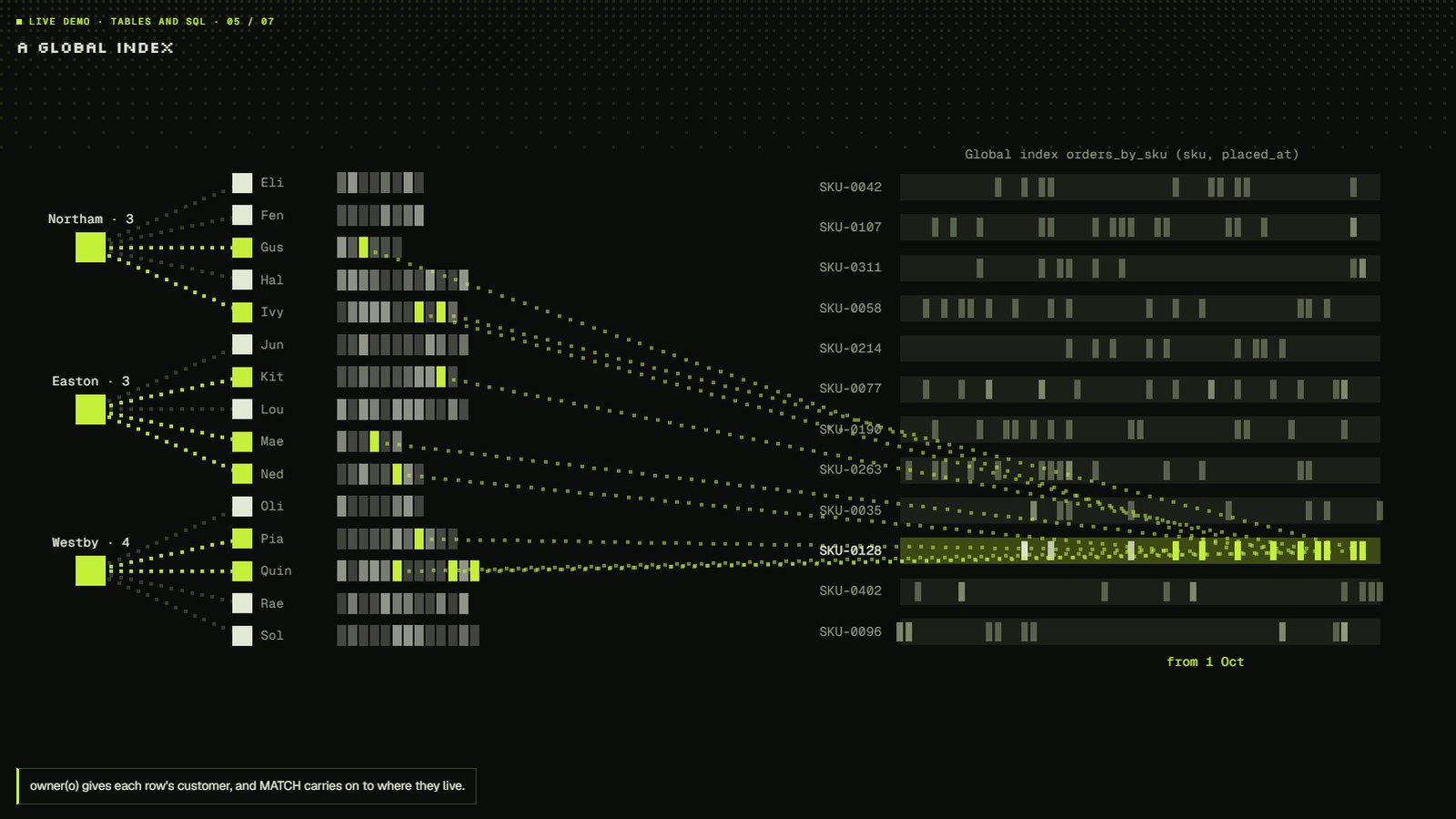
a column rewrites nothing: rows already there read its default. A global
index spans every customer, so "every order for SKU X this week" is one
range, with the owning node to carry on through the graph:
CALL SQL {
  SELECT owner(o) AS c, o.amount AS amount
  FROM Order AS o
  WHERE o.sku = $sku AND o.placed_at >= $since
}
MATCH (c)-[:LIVES_IN]->(city:City)
RETURN city.name, sum(amount) AS spend
ORDER BY spend DESC;
Small, and it stays small
We loaded 100,000 synthetic orders, a hundred for each of
1,000 customers, both ways on the same machine: as :Order nodes
linked to their customer with a date index, and as rows of an Order table
with a date index.
| As nodes | As table rows | |
|---|---|---|
| Bytes on disk per order | 84.7 | 62.8 |
| Loading | 38,300 orders/s | 39,200 orders/s |
| A customer's latest 10 orders (p50) | 118 µs | 109 µs |
| A customer's top five SKUs by spend (p50) | 155 µs | 155 µs |
Rows store no type tags and no column names, and key columns live in the
key alone. Deleted rows give their space back: pages left mostly empty are
joined with their neighbours as changes are written, and
CALL gdb.compact() packs a database fully when you want every byte back.
Returning a node never returns its rows. A client sees a small summary, the table's type, row count and columns, so a node with ten million rows costs the same to fetch as one with ten. Rows come back only when a query asks.
Safe by design
- Reading a table needs
MATCH; changing one needsWRITE, exactly as for any other property. Table types have their ownTABLE TYPE MANAGEMENTprivilege. - Every change runs in the statement's transaction: graph and rows commit together or not at all.
- Change streams carry row events with the row before and after, so downstream systems see inserted, updated and deleted rows.
CHECK,NOT NULL,UNIQUEand the primary key are checked on every write.
See it work
Seven of these patterns run in the Tables and SQL demo,
each with the query that produces it: rows on a node, the graph then its rows, rows in a WHERE,
time series by key range, a global index, constraints and upserts, and one
ALTER for every table.
This interactive demo needs WebGL. Read about it.
Getting 2.1
Pull ianknowles/galactus-db:2.1.0, or latest. Galactus DB 2.1 opens 2.0
and 1.x databases as they are; a database stays readable by 2.0 until it
creates its first table. Start with the tables guide, the
SQL reference and the Tables and SQL demo.
Measured on Galactus DB 2.1.0, Paged storage, on an Intel Core i9-13900K with
64 GB of RAM running Windows 11, from the embedded engine, after
CALL gdb.compact(). Every order and customer was generated for the test.